
AI assistants have come a long way from simple chatbots that only answer questions. In 2026, a new type of AI tool is gaining massive attention among tech enthusiasts, developers, and privacy-conscious users worldwide. It's called OpenClaw, and it's changing how people think about personal AI assistants.
Unlike tools such as ChatGPT or Google Gemini that live in the cloud and send your data to external servers, OpenClaw runs directly on your own computer, laptop, or server. It doesn't just chat—it takes action. It can send messages, automate tasks, browse the web, manage your files, set reminders, and even control apps, all from a simple chat interface through messaging apps you already use.
In this complete guide, you will learn what OpenClaw is, how it works, its key features, advantages, disadvantages, and how it compares to other AI tools in 2026.
What Is OpenClaw?
OpenClaw is an open-source, self-hosted AI agent that runs on your own hardware and uses large language models (LLMs) to carry out real tasks on your behalf.
It was first released in November 2025 under the name Clawdbot, went viral quickly among developers and AI insiders, and was later rebranded to OpenClaw.
As of early 2026, it has gained over 180,000 stars on GitHub, making it one of the fastest-growing open-source AI projects in history.
The key difference between OpenClaw and cloud-based AI tools is simple:
- Cloud AI (ChatGPT, Gemini): Your data goes to external servers. You get answers. That's it.
- OpenClaw: It runs on your machine. Your data stays private. And it doesn't just answer—it acts.
How Does OpenClaw Work?
OpenClaw is built around a core component called the Gateway.
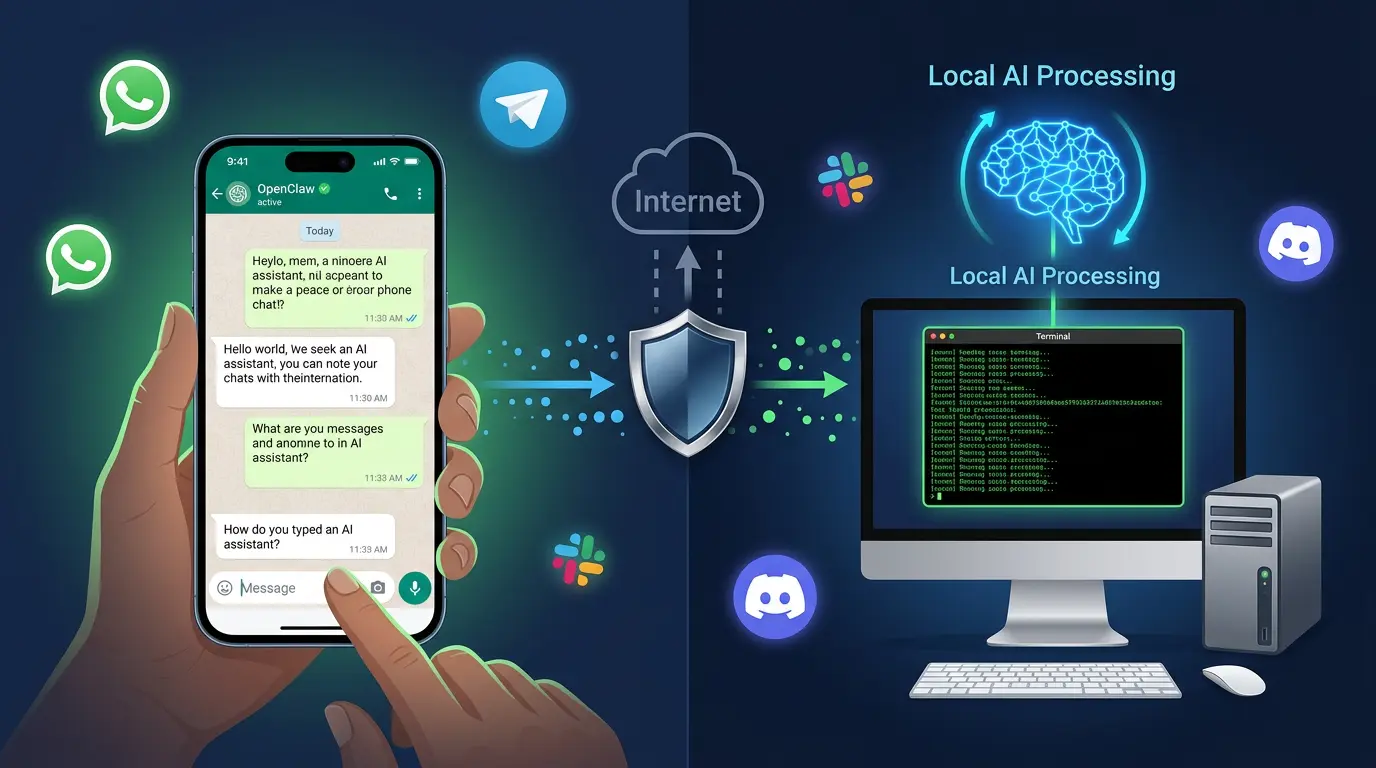
The Gateway runs continuously on your hardware (Mac, Windows PC, Linux server, or even a Raspberry Pi or VPS). It connects to the messaging apps you choose, listens for your commands, routes them to an AI model, uses tools or skills to take action, and sends the response back to you through the same messaging app.
Here is the basic flow:
- You send a message to OpenClaw through WhatsApp, Telegram, Slack, Discord, or another supported app.
- The Gateway receives the message and sends it to your chosen AI model (Claude, GPT-4o, Gemini, or a local model).
- The AI model decides what to do — answer directly, use a tool, run a skill, or trigger automation.
- OpenClaw executes the action (browse web, open a file, send an email, etc.) and replies to you.
The whole process happens on your hardware, which means your conversations, memory, and data never leave your control.
Key Features of OpenClaw
1. Multi-Platform Messaging Support
OpenClaw connects to over 50 messaging channels including WhatsApp, Telegram, Slack, Discord, Signal, iMessage, Google Chat, Microsoft Teams, and more.
This means your AI assistant lives inside apps you already use every day. You don't need to open a new app or browser tab to get help.
2. Long-Term Memory
Unlike most AI tools that forget everything after each conversation, OpenClaw has persistent memory.
It remembers your preferences, ongoing tasks, and past interactions across sessions. This makes it feel more like a real personal assistant that learns about you over time.
3. Skills and Tool System
OpenClaw uses a modular skills system that gives it specific powers you choose to enable or disable.
Skills include:
- Browser control (click buttons, fill forms, take screenshots)
- File operations (read, write, organize files)
- Shell commands (run terminal commands)
- Email management (read and send emails via Gmail or Outlook)
- Calendar integration (Google Calendar scheduling)
- Web search (search and summarize results)
- CRON jobs (automate recurring tasks on a schedule)
You decide exactly which skills are active. If you don't want OpenClaw touching your email, simply leave that skill off.
4. Works With Any AI Model
OpenClaw is model-agnostic, meaning it works with any major AI model.
You can connect it to:
- Cloud models like Claude (Anthropic), GPT-4o (OpenAI), or Gemini (Google)
- Local offline models like Llama or Mistral via Ollama
This gives you total flexibility — use the most powerful model for complex tasks, or switch to a free local model when privacy is the priority.
5. Proactive Automation (CRON and Heartbeats)
Most AI tools only respond when you ask. OpenClaw can also proactively initiate actions on a schedule.
Examples:
- Send you a daily morning briefing (news, calendar, emails)
- Remind you of upcoming deadlines
- Auto-check a website and notify you when something changes
- Run background tasks at set intervals
This makes it a true autonomous AI agent, not just a reactive chatbot.
6. 100% Self-Hosted and Private
Everything runs on your own hardware.
Your data, conversations, agent memory, files, and API keys are stored locally. Nothing is sent to OpenClaw's servers (there aren't any). This gives you full digital sovereignty over your AI assistant.
Advantages of OpenClaw
Complete Data Privacy
The biggest advantage is privacy.
When you use cloud AI tools, your prompts, documents, and sensitive data are sent to external servers where they may be logged or used for training. With OpenClaw, none of that leaves your machine.
Professionals who handle confidential client data, financial records, legal documents, or proprietary code can safely use OpenClaw without worrying about data leaks.
Full Customization and Control
Because it is open-source, you can modify OpenClaw however you want.
You control which skills are active, which AI model powers it, how it responds, how it handles memory, and which channels it connects to. No restrictions, no subscriptions, no locked features.
Works Across All Your Messaging Apps
Having your AI agent inside WhatsApp, Telegram, or Slack is genuinely convenient.
You don't need to visit a website or open a separate app. Send a message wherever you already spend time, and your assistant is ready.
Free to Use (Open Source)
OpenClaw itself is completely free.
You only pay for the AI model API you choose (e.g., OpenAI or Anthropic API costs). If you use a local model, your total cost is zero.
Runs Offline with Local Models
With a local model like Llama via Ollama, OpenClaw can work completely offline.
This is invaluable for sensitive use cases or environments with limited internet access.
Disadvantages of OpenClaw
Not Beginner Friendly
OpenClaw requires comfort with the terminal (command line), basic networking concepts, and some understanding of API keys and configuration files.
If you are not a technical user, the initial setup can feel overwhelming. There are guides and tutorials available, but it is not a "click and go" tool like most consumer apps.
Requires Always-On Hardware
For OpenClaw to work 24/7, you need hardware that stays on, like a home server, VPS, or a computer that never sleeps.
Running it on a laptop you close at night means your agent goes offline. Most serious users host it on a VPS (Virtual Private Server) for true 24/7 availability.
Security Risks If Set Up Incorrectly
Because OpenClaw can execute shell commands, send emails, and control your browser, a misconfigured setup could be dangerous.
If you expose the control interface to the internet without proper authentication, others could potentially access your agent. Following security best practices (strong passwords, proper firewall rules, dedicated accounts for the agent) is essential.
Higher Latency Than Cloud Tools
Compared to cloud-based AI tools, OpenClaw's Gateway has slightly higher cold-start times.
At low workloads, response times average around 150–300ms, which is fine for personal use. But if you're doing something time-critical, dedicated cloud services may still feel snappier.
OpenClaw vs Other AI Agents
| Feature | OpenClaw | ChatGPT | LangChain/AutoGPT |
|---|---|---|---|
| Self-hosted | ✅ Yes | ❌ No | ⚠️ Partial |
| Data privacy | ✅ Full local | ❌ Cloud | ⚠️ Depends |
| Proactive tasks | ✅ Yes | ❌ No | ⚠️ Limited |
| Messaging apps | ✅ 50+ channels | ❌ Web only | ❌ No |
| Long-term memory | ✅ Yes | ⚠️ Limited | ⚠️ Varies |
| Model flexibility | ✅ Any LLM | ❌ OpenAI only | ✅ Yes |
| Beginner friendly | ❌ Technical | ✅ Easy | ❌ Technical |
| Cost | ✅ Free | ❌ Subscription | ✅ Free |
OpenClaw sits in a unique position — more private and flexible than ChatGPT, but more user-friendly and production-ready than developer frameworks like LangChain.
Who Should Use OpenClaw?
OpenClaw is ideal for:
- Developers and engineers who want a personal AI assistant they fully control
- Privacy-conscious professionals working with sensitive data (lawyers, consultants, researchers)
- Tech-savvy individuals who want their AI agent embedded in their everyday messaging apps
- Home lab enthusiasts who enjoy self-hosted tools
- Anyone tired of paying monthly fees for AI tools with usage limits
It is probably not the right fit for:
- Casual non-technical users who just want a simple chatbot
- Teams needing multi-user enterprise AI with managed infrastructure
- People who don't have hardware to run it continuously
How to Get Started With OpenClaw
Getting started with OpenClaw is straightforward if you have some terminal experience:
Install OpenClaw using the official install script:
curl -fsSL https://openclaw.ai/install.sh | bashRun the onboarding wizard to configure your API keys and basic settings:
openclaw onboard --install-daemonConnect your messaging channels (WhatsApp, Telegram, Slack, etc.):
openclaw channels login- Enable the skills you want to use via the Control UI dashboard.
- Send your first message through your messaging app and watch it take action.
Official documentation is available at docs.openclaw.ai with guides for installation on Mac, Windows, Linux, and VPS platforms.
Conclusion
OpenClaw is one of the most exciting open-source AI tools to emerge in recent years. In a world where most AI assistants lock your data in the cloud and limit what you can do, OpenClaw gives you a genuinely private, flexible, and powerful AI agent that lives on your own hardware.
It connects to the messaging apps you already use, remembers your context across sessions, takes real actions (not just answers), and works with any AI model you choose — all completely free.
Yes, it requires some technical knowledge to set up, and it needs always-on hardware to work around the clock. But for developers, privacy-focused professionals, and serious tech users, OpenClaw represents a real shift in how personal AI assistants can and should work.
If you value data privacy, flexibility, and having full control over your AI tools, OpenClaw is absolutely worth trying in 2026.
.webp)



Comments 0
No comments yet
Be the first to share your thoughts!
Leave a Comment